The two speakers either side of the stage connect to the Lectern PC via Bluetooth. Please ensure that you have followed the below steps.
1. Ensure the power sockets are on.
There are two sockets, one on either side of the stage that must be turned on.
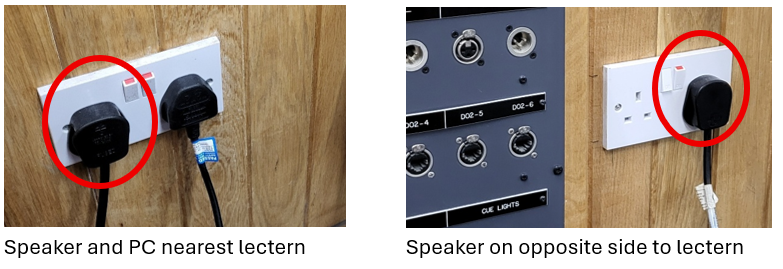
2. Make sure both speakers are powered on.
There is a rocker switch toward the base of the speakers which should be in the I position.
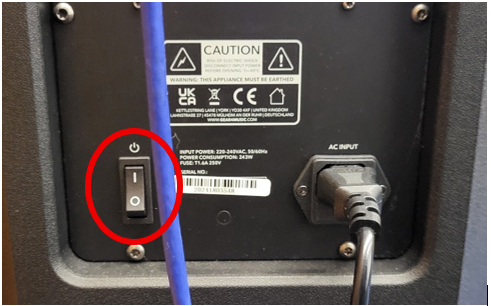
When both speakers are on, a blue light will flash for a moment and then you will hear “Left Channel” and “Right Channel” the light will also turn solid blue – this means the speakers are paired.
3. Log into the PC.
Please note: if you had to power the socket on in step one, you would also need to power on the PC on the shelf below the screen.
4. Verify that the speakers are connected.
Click on the speaker icon to the bottom right. The Bluetooth icon should be solid blue and say ‘D-Series’.
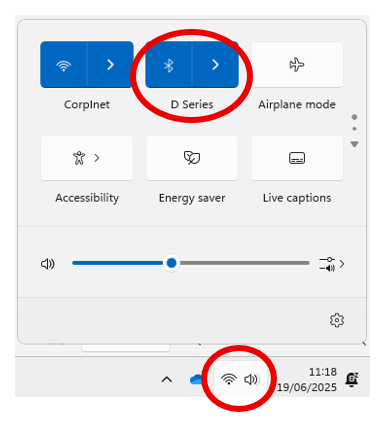
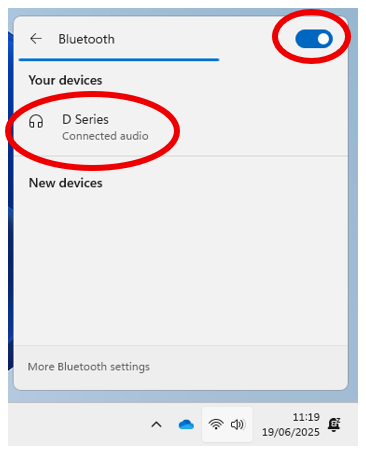
If it isn’t, click on the Bluetooth icon and then toggle the switch to On. If prompted connect to D-Series.
5. Play your media as intended and you will hear it play.
Please note that the blue light on both speakers will flash whilst music is playing. This is normal.
Was this article helpful?
That’s Great!
Thank you for your feedback
Sorry! We couldn't be helpful
Thank you for your feedback
Feedback sent
We appreciate your effort and will try to fix the article